
Story, Live & DM
Automatically DM people from story replies, story mentions, comments during a Live, or DMs with a keyword.
Besides comments on posts, automations can be triggered from three other sources. They're all made in the same editor: in the Trigger step, choose the right Source.
| Source | Triggered by | Tab in the automation list |
|---|---|---|
| Story | Replies to your story, or mentions of your account in other people's stories | Story |
| Live | Viewers' comments while you're Live | Live |
| Messages | Incoming DMs with a keyword | Message |
This guide is for the new dibales.ai dashboard. Still on the old layout? See Story Reply, Story Mention, and Live to DM.
Before you start
- A professional Instagram account that's connected, see Connect Your Accounts.
- Another Instagram account to test with. DMs can't be sent to your own account.
- You've made an automation with Comment to DM before. This page only covers what's different. The other steps (Opening message, Ask for Follow, Main message, and so on) work the same way. The Comment reply step is only available for Posts and Reels.
How to start
All four types below start the same way:
- Open Instagram › Comment to DM, click Create automation, then choose Start from scratch.
- Fill in the Automation name, for example Story Promo.
- Click the Trigger step, then choose the Source for the section below.
Once every step is filled in, click Create automation. The automation shows up in the Story, Live, or Message tab on the Comment to DM page.
Story replies
Viewers who reply to your story with a certain word get a DM right away. Unlike a link sticker, everyone who's interested lands in your DMs, so you can collect their contacts and send follow-ups.
Here's today's story promo code: STORYSAVER, 15% off all drinks ☕
See the menu1. Set up the trigger
In the Trigger, choose Source › Story.
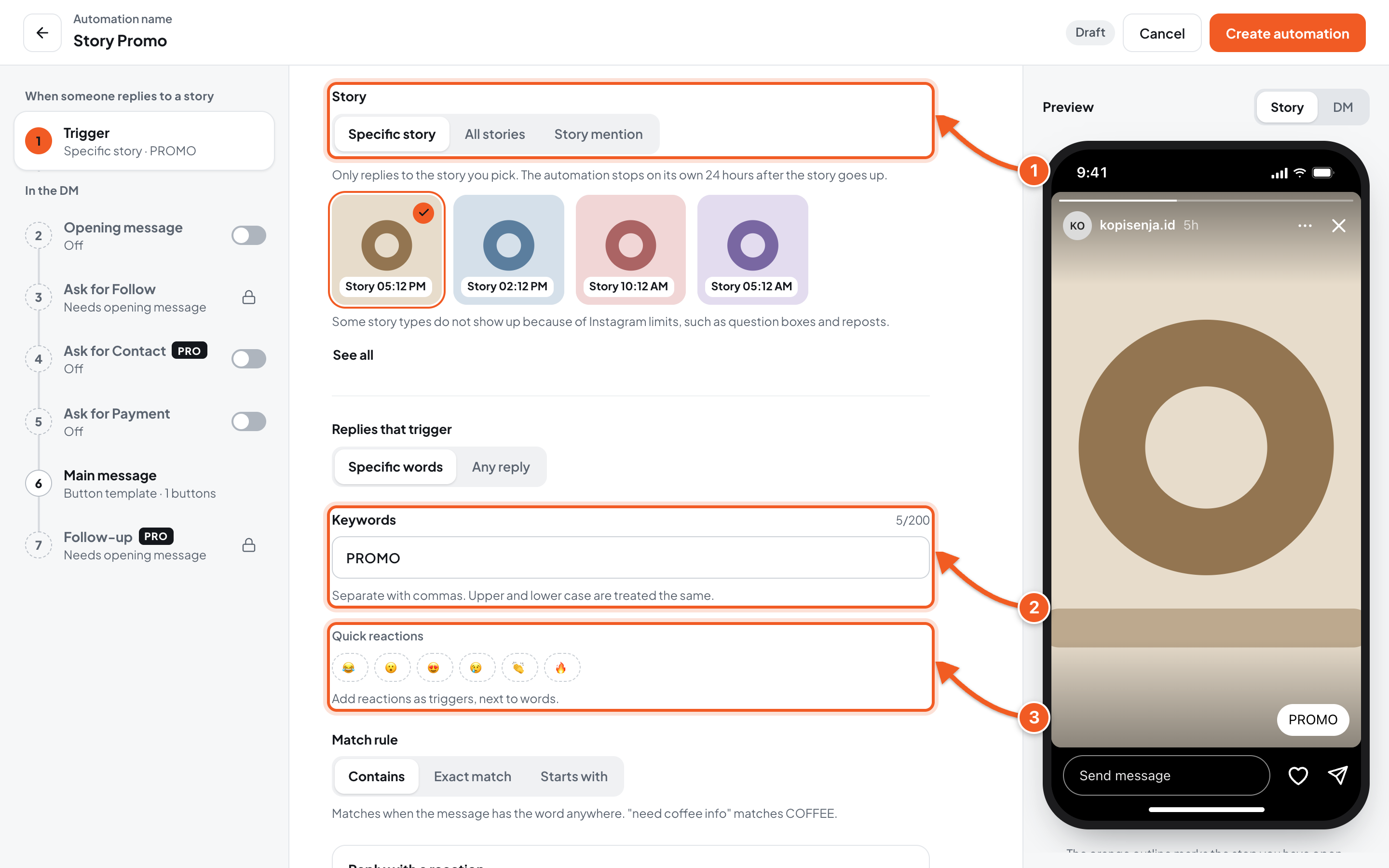
- Story: choose the target.
- Specific story: click the story. The automation stops on its own 24 hours after that story goes up. Some story types, such as question boxes and reposts, don't show up because of Instagram limits.
- All stories: applies to replies on all your stories. Good when the keyword is always the same.
- Keywords: the word the reply must contain, for example PROMO. Choose Any reply above it if every reply should get an answer.
- Quick reactions (optional): click an emoji to make that reaction a trigger too, besides words.
Below it, Reply with a reaction adds a ❤️ reaction to every incoming story reply when it's on.
2. Fill in the Main message, save, then try it
- Fill in the Main message as in step 7 of Comment to DM, then click Create automation.
- Post the story. Add a call to action so viewers know what to reply, for example Reply PROMO to this story.
- From another Instagram account, reply to the story with the keyword. The DM arrives on that account.
Story mentions
Automatically DM people who mention your account in their story. Great for cafés, shops, or places customers often tag.
Thanks for mentioning Kopi Senja in your story! 🙌 Show the code MENTIONKS at the counter for a free topping on your next visit.
See the location1. Set up the trigger
In the Trigger, choose Source › Story.
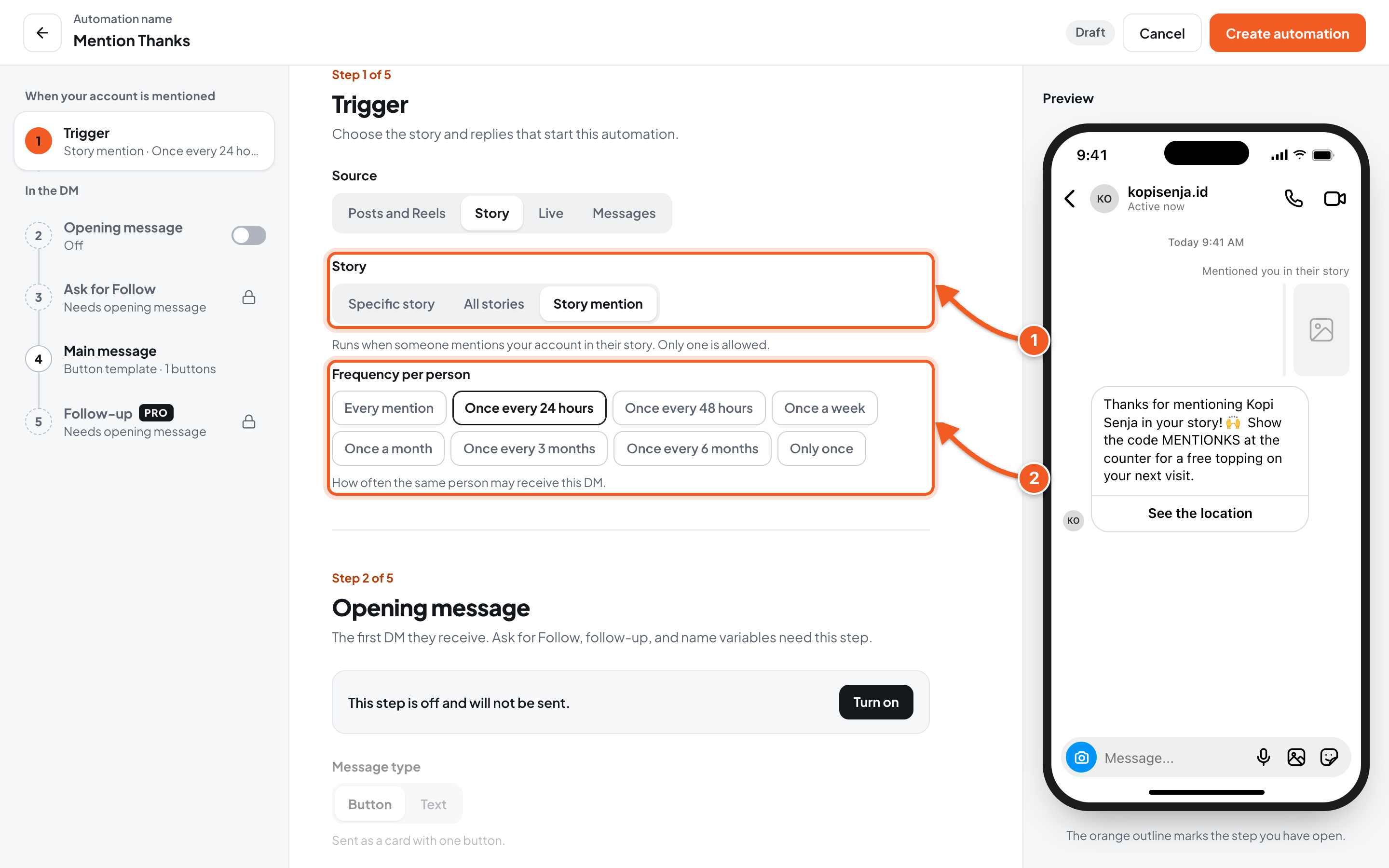
- Story: choose Story mention.
- Frequency per person: how often the same person may receive this DM, from Every mention to Only once. Choose Once every 24 hours so customers who post several stories on the same day only get one reply.
There can only be one Story mention automation. Want to change the message? Edit the one you already have.
2. Fill in the Main message, save, then try it
- Fill in the Main message, such as a thank-you and a voucher, then click Create automation.
- From another Instagram account, post a story that mentions your account (for example @kopisenja.id). The DM arrives on that account.
Comments during a Live
Viewers who comment a certain word while you're Live get a DM right away, without you replying one by one.
1. Choose the Live source and fill in the Live content
In the Trigger, choose Source › Live. Keywords aren't set in the Trigger step, but per content item in the Live content step, which replaces the Main message.
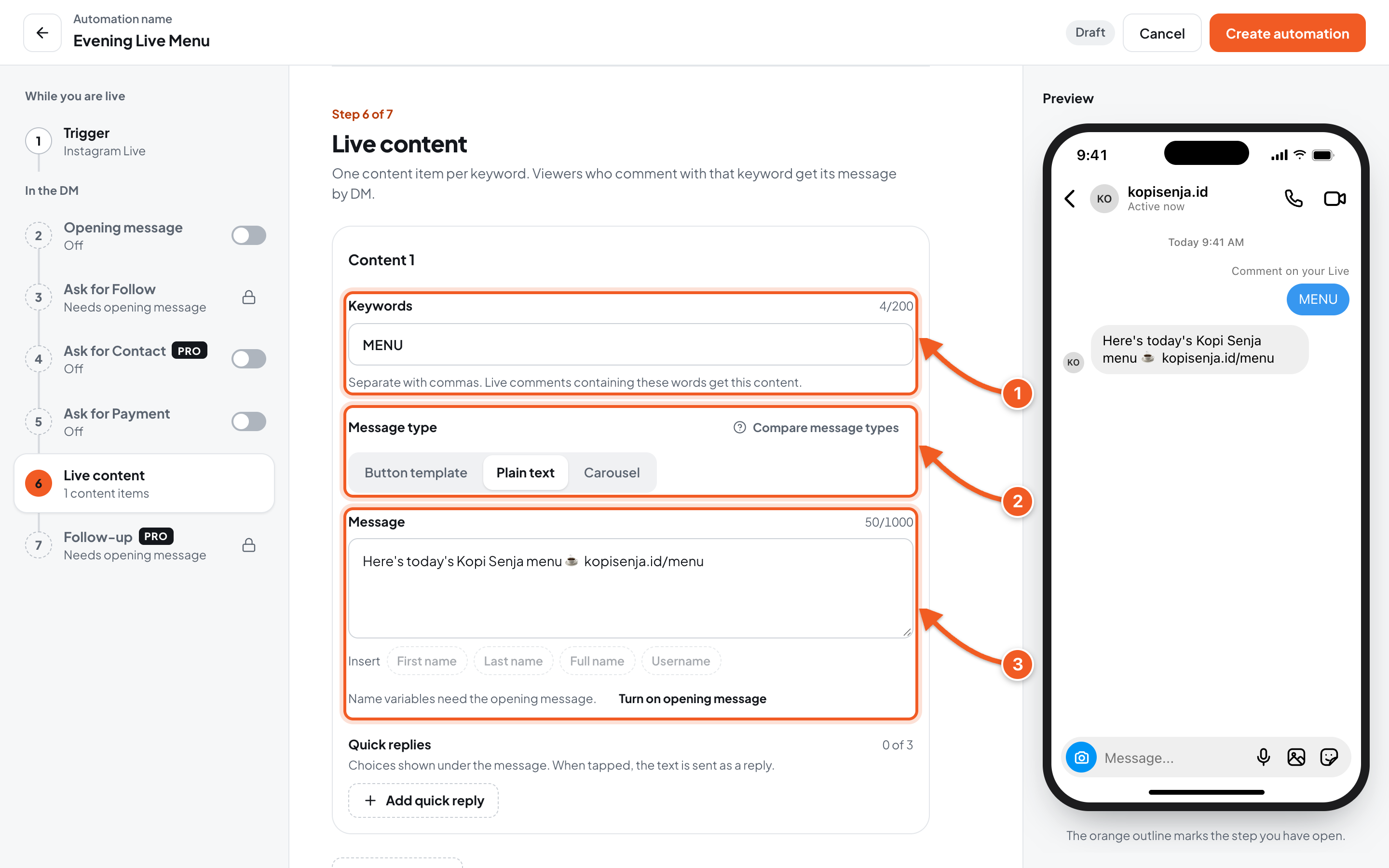
- Keywords: Live comments that contain this word get this content, for example MENU. Separate several words with commas.
- Message type: Button template, Plain text, or Carousel.
- Message: what's sent by DM.
- Add content: add another keyword with a different message, for example MENU for the menu and PROMO for a discount code.
Only one Live automation can run at a time. If another Live automation is running when you save, choose Yes, save and run to stop the old one, or No, save as paused. Set the automation up before you go Live.
2. Save, then try it
- Click Create automation.
- Go Live. From another Instagram account, watch the Live and write a comment with the keyword. The DM arrives on that account.
DMs with a keyword
Automatically answer incoming DMs that contain a certain word, no comment needed. Great for questions you get often, such as prices or your location.
Hi! Here's the Kopi Senja menu price list ☕
See the price list1. Set up the trigger
In the Trigger, choose Source › Messages.
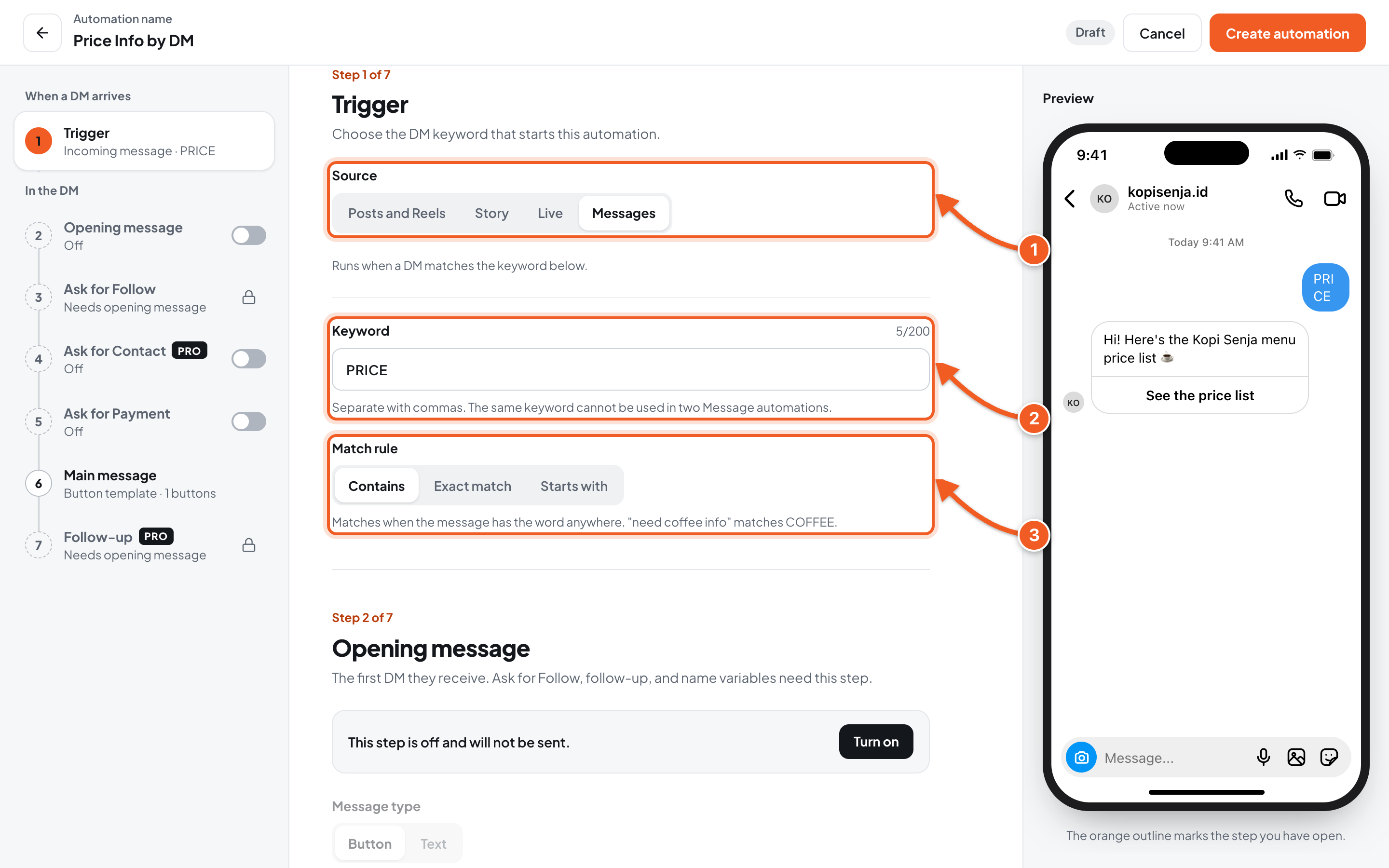
- Source: choose Messages.
- Keyword: the word the DM must contain, for example PRICE. The same keyword can't be used in two Message automations.
- Match rule: Contains, Exact match, or Starts with, just like in Comment to DM.
2. Fill in the Main message, save, then try it
- Fill in the Main message, then click Create automation.
- From another Instagram account, send a DM with the keyword to your account. The reply arrives on that account.
Troubleshooting
| Problem | Fix |
|---|---|
| The story you want doesn't show up | Some story types, such as question boxes and reposts, can't be picked because of Instagram limits. Use All stories. |
| Story replies stop getting answers the next day | A Specific story automation stops on its own 24 hours after that story goes up. Make a new automation for the next story, or use All stories. |
| You can't choose Story mention: An automation for Story mention already exists. Pick another target. | There can only be one Story mention automation. Edit the one you already have. |
| The same customer doesn't get the mention DM again | Check the Frequency per person. For example, with Once every 24 hours, a second mention on the same day doesn't get a reply. |
| The Live automation isn't running | Only one Live automation can run. If you chose No, save as paused when saving, the automation is still paused. Open Edit, save again, then choose Yes, save and run to stop the old one. |
| You can't save: Add at least one content item. | In the Live content step, fill in at least one content item with its keyword and message. |
| You can't save the keyword: This keyword is already used by another Message automation. | Change the keyword, or edit the Message automation that already uses it. |
| You tested from your own account and got no DM | DMs can't be sent to your own account. Test from another Instagram account. |