
Conversation Starters
Quick questions people see the first time they open your Instagram DM, each with an automatic reply.
Conversation starters are questions people see the first time they open your Instagram DM, for example How do I order? When someone taps a question, the reply is sent automatically.
This guide is for the new dibales.ai dashboard. Still on the old layout? See Set Up Conversation Starters.
Before you start
- This page is for agents that already use conversation starters. For other agents, conversation starters are managed in Flow Builder:
- On the Pro plan, this page shows Conversation starters moved to Flow Builder. Click Open Flow Builder, then manage them in flow.dibales.ai, see Flow Builder.
- On the Plus plan, this page shows Conversation starters are a Pro feature with an Upgrade plan button.
- An active subscription and a connected Instagram account. If Instagram isn't connected, this page shows Instagram is not connected. Follow Connect Your Accounts.
- Another Instagram account that has never messaged yours, to test with. Conversation starters only show in new conversations.
- Instagram allows 4 conversation starters per account, including the ones managed in Flow Builder.
1. Open Conversation Starter
In the sidebar, open Instagram › Conversation Starter. On a phone, open the menu first with the ☰ icon at the top right.
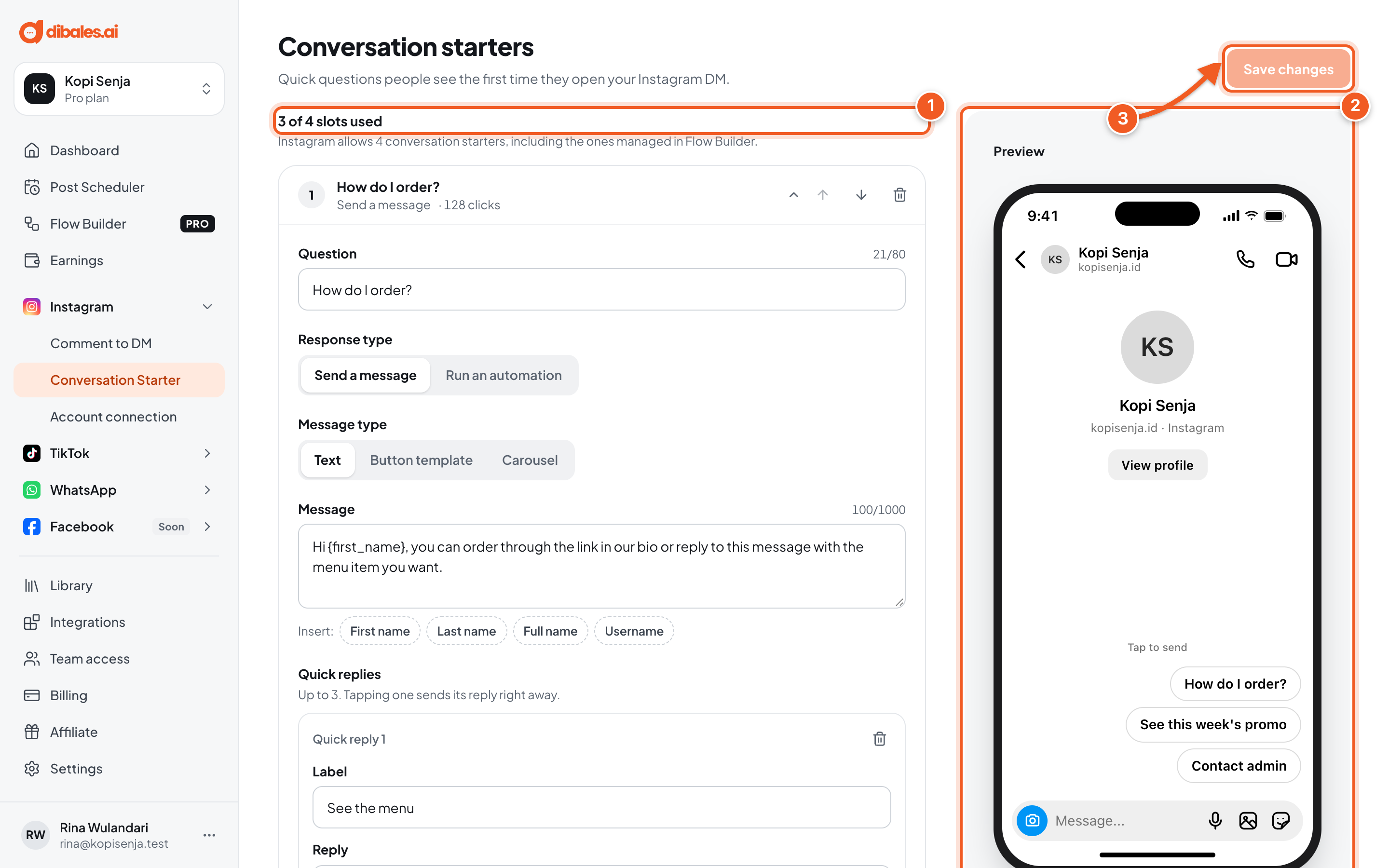
- How many of the 4 slots are used.
- Preview: an empty Instagram DM with your questions. On a phone, the preview is below the list.
- Save changes: your changes only take effect after you click this button.
Each question shows its click count. Click a question to expand or collapse it, and use the arrows next to it to reorder.
2. Add a question with a message reply
Click Add conversation starter below the list.
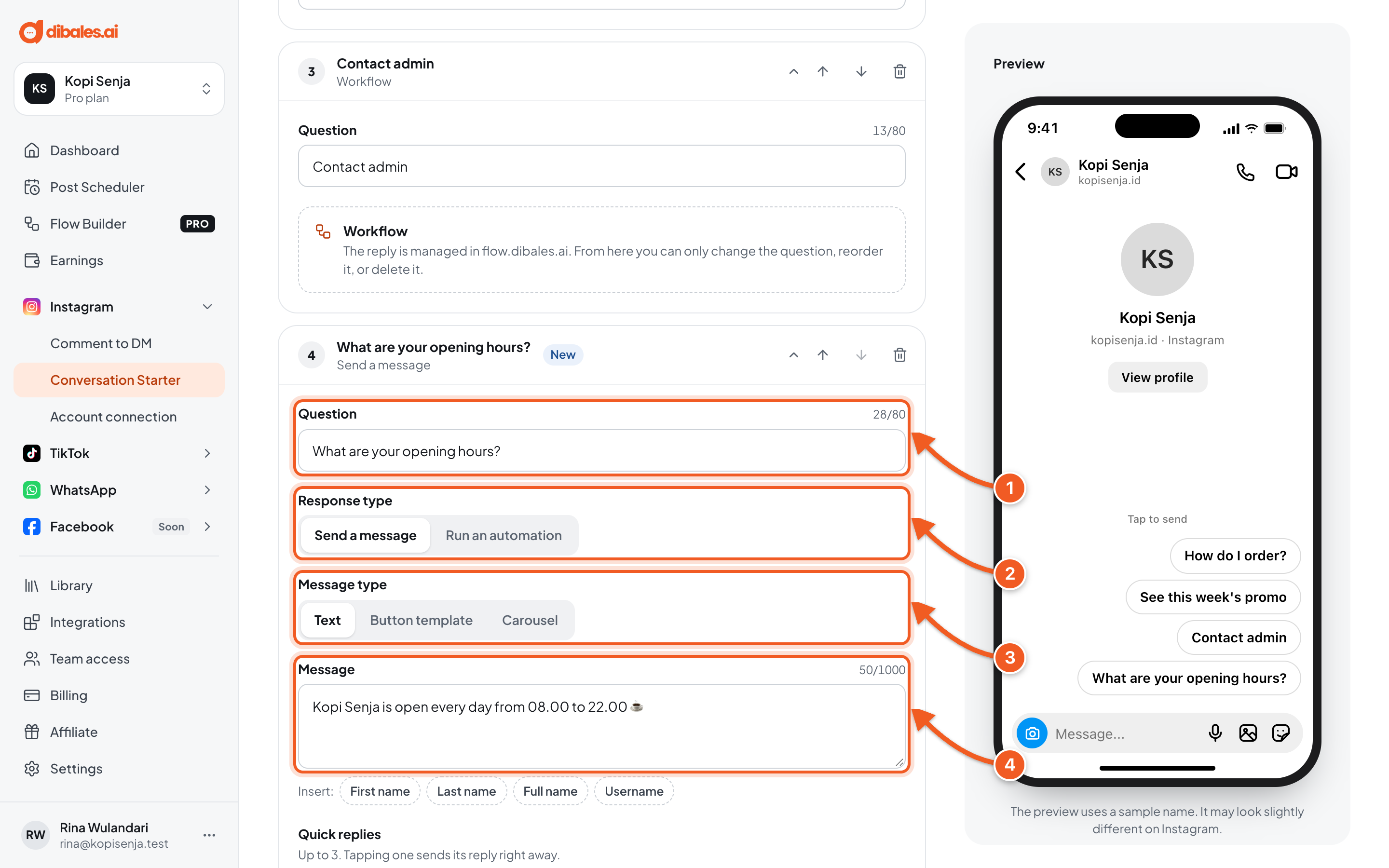
- Question: the text your audience taps, up to 80 characters. For example: What are your opening hours?
- Response type: choose Send a message.
- Message type: Text, Button template, or Carousel.
- Message: the reply. Click First name or another variable under Insert to include your audience's name.
For the Text type, you can add up to 3 Quick replies: options under the message that send their reply right away when tapped.
3. Run an automation from a question
A question can also run an existing automation, for example one that asks for an email before sending a link.
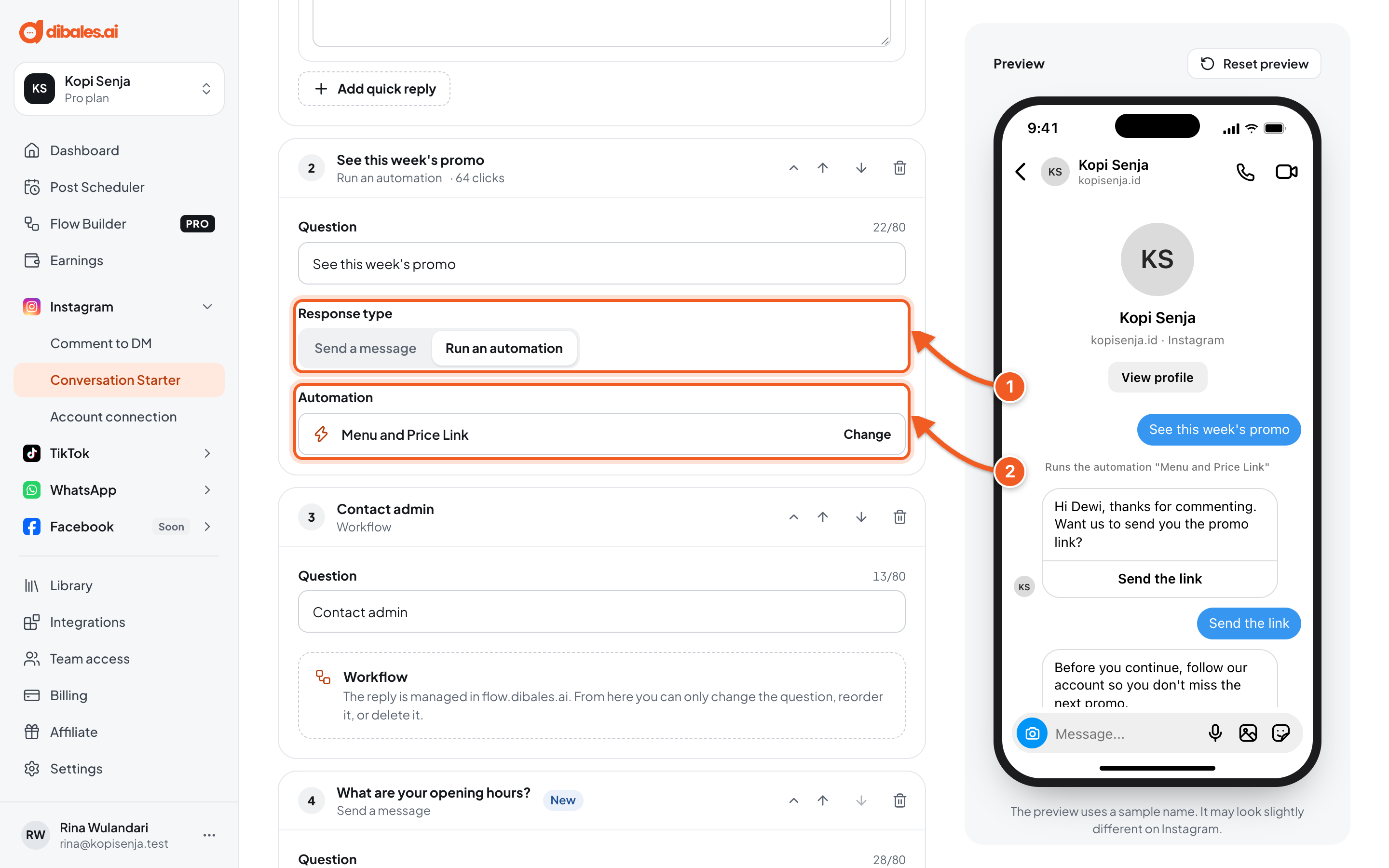
- Response type: choose Run an automation.
- Automation: click Choose an automation (or Change), then pick one from the Post, Story, or DM tab. Only running automations can be selected.
Questions marked Workflow are managed in flow.dibales.ai. From here you can only change the question, reorder it, or delete it.
4. Delete questions you don't use (optional)
Click the trash icon on the question's row, then click Delete in the Delete this conversation starter? confirmation. The question is only removed for real after you save your changes. If the question is marked Workflow, its workflow can no longer be triggered from the DM.
5. Save
Click Save changes. You'll see Conversation starters saved. If a field is wrong, Some fields need fixing appears with the question's number.
6. Try it
- Check the Preview first: tap a question to see the reply that will be sent. Click Reset preview to start over.
- From another Instagram account that has never messaged yours, open a DM to your account. The questions show up under the empty conversation.
- Tap one of the questions. The reply is sent automatically, and that question's click count goes up on the Conversation Starters page.
Tips: use short sentences that sound like something your audience would type, for example Show me the catalog 📦 or Any promo today? 🔥. Long sentences can get cut off on phones.
Troubleshooting
| Problem | Fix |
|---|---|
| The questions don't show in the DM | Conversation starters only show in new conversations. Test from an account that has never messaged yours, and make sure you clicked Save changes. |
| Conversation starters moved to Flow Builder shows | Your agent manages conversation starters in Flow Builder. Click Open Flow Builder, then follow Flow Builder. |
| The Add conversation starter button is missing | All four slots are used, including the ones managed in Flow Builder. Delete one first. |
| The question can be up to 80 characters. | Shorten the question. |
| Choose an automation. or Automation not found (it was deleted) | Click Choose an automation or Change, then pick a running automation. |
| Enter a valid URL that starts with https://. | Complete the button address, for example https://kopisenja.id/menu. |
| Every slide needs the same number of buttons. | In a Carousel, give every slide the same number of buttons. |
| Questions marked Workflow can't be edited | Their replies are managed in Flow Builder (flow.dibales.ai). From here you can only change the question, reorder it, or delete it. |