
Earnings
Track income from Ask for Payment, then withdraw the balance to your bank account.
The Earnings page sums up income from your Ask for Payment automations on Instagram, TikTok, and WhatsApp, and it's where you withdraw your balance to your bank account.
Buyer payments can only come in after identity verification is done. You verify once through Singapay, dibales.ai's payment partner, and it applies to all your agents. Approval usually takes a few business days. See the verification form guide.
This guide is for the new dibales.ai dashboard.
Before you start
- Approved identity verification. If it isn't done yet, this page shows Identity verification with a Start verification button.
- An automation with Ask for Payment that already has orders, for example from Instagram Ask for Payment or TikTok.
- A bank account in your own name to receive withdrawals, and access to your account email to receive the OTP code when changing the bank account.
1. See your earnings summary
In the sidebar, click Earnings. On a phone, open the menu first with the ☰ icon at the top right.
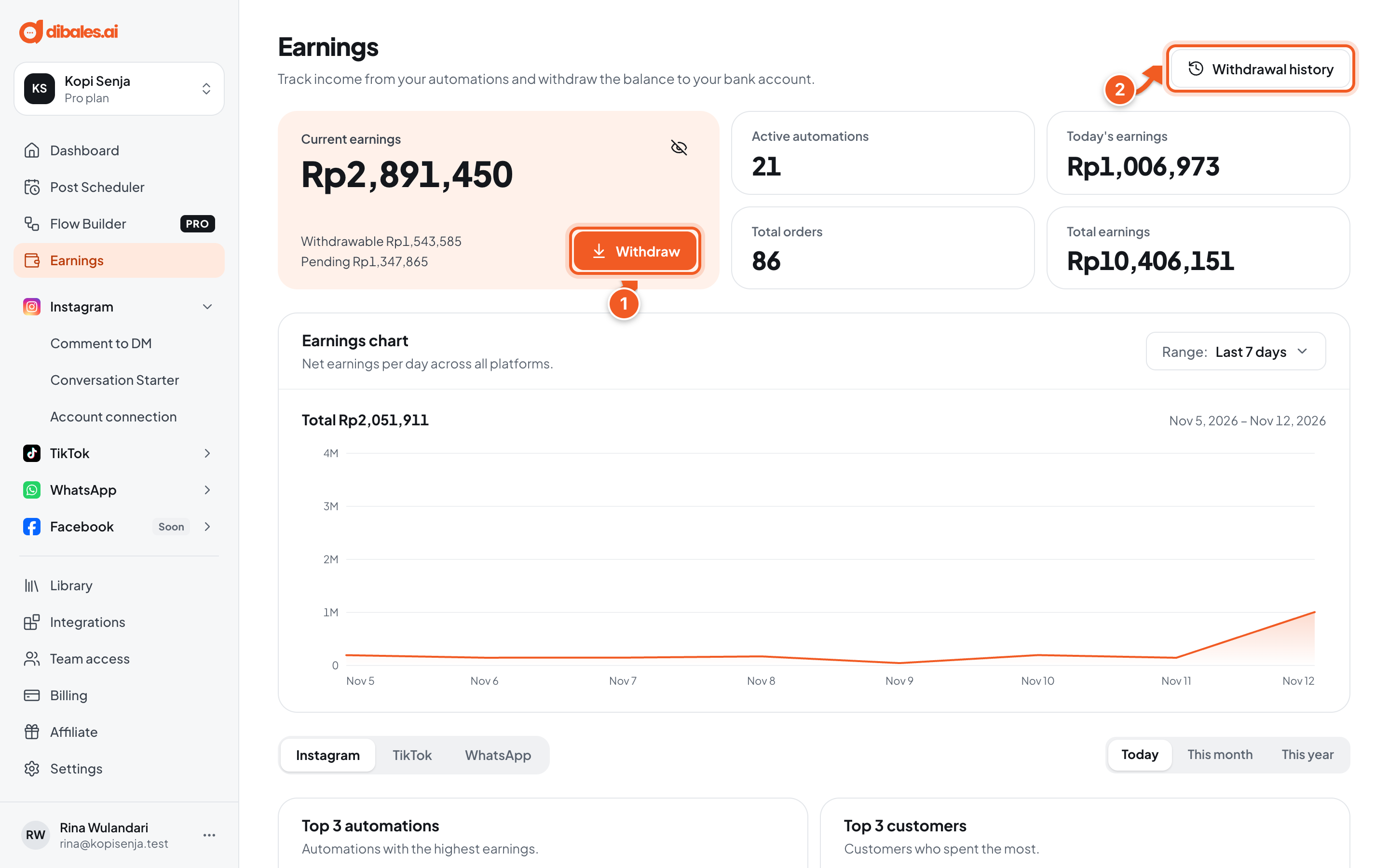
Current earnings is split into Withdrawable and Pending. Pending earnings are payments that are still being processed, and can usually be withdrawn 1 to 3 business days after payment. Click the eye icon to hide the amounts.
- Withdraw: withdraws the withdrawable balance to your bank account.
- Withdrawal history: your past withdrawals and their status.
Below that are your active automations, today's earnings, total orders, and total earnings, followed by:
- Earnings chart: net earnings per day. Pick the period with Range.
- Top 3 automations and top 3 customers, by platform and by period (today, this month, this year).
- Orders: every order from your automations, with status, fees, and net amount.
2. Withdraw earnings
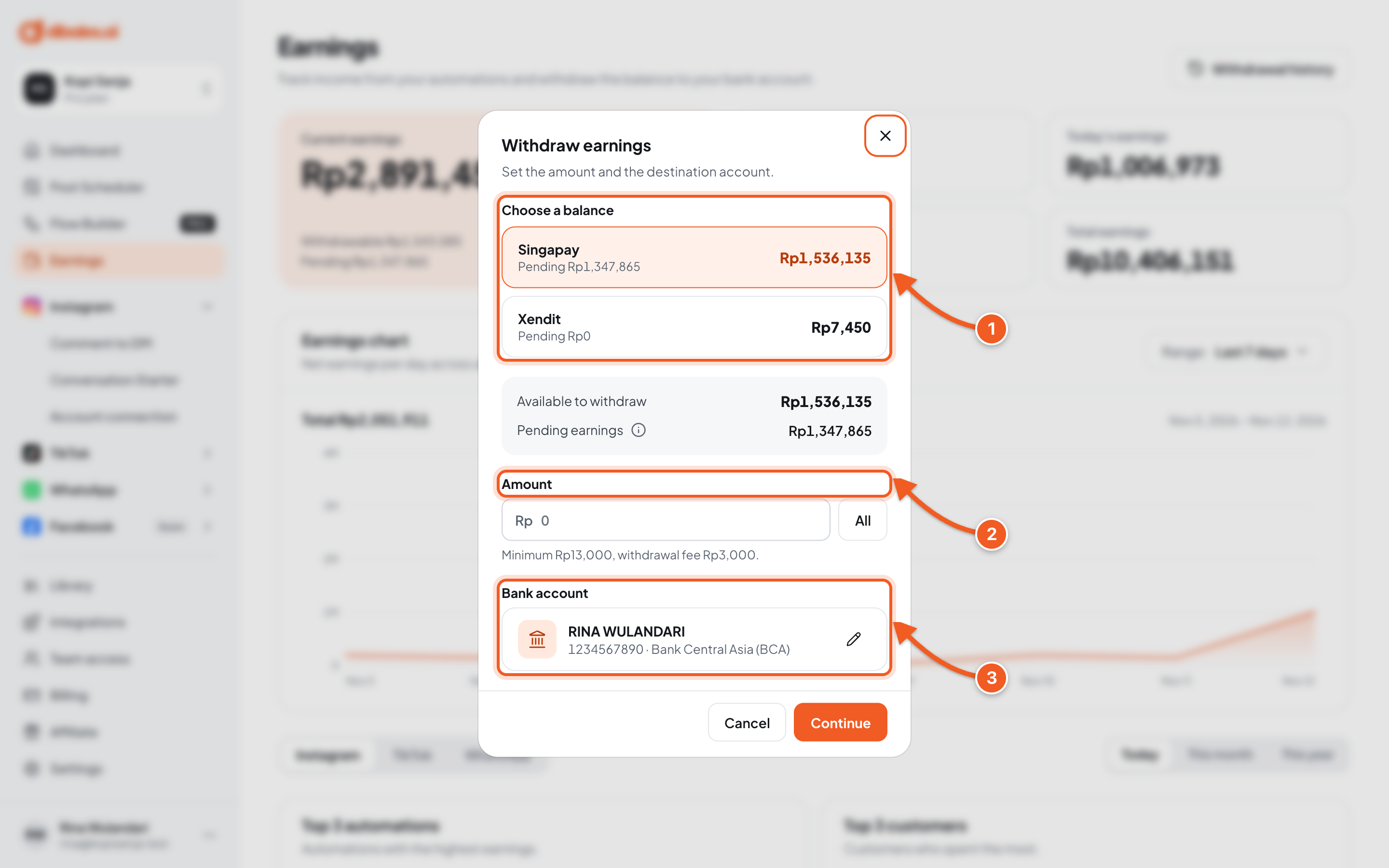
- Choose a balance: pick which balance to withdraw.
- Amount: enter the amount, or click All. The minimum and the withdrawal fee are shown below the field.
- Bank account: where the money goes. Click the pencil icon to change it. Changing the account needs an OTP code sent to your email.
Click Continue, check the details once more in Confirm withdrawal (bank, account number, fee, and Amount you receive), then click Continue withdrawal. Withdrawals are processed within 1 to 2 business days (instant withdrawal is currently for selected users only). While a withdrawal is still being processed, you can't create a new one.
3. Check the result
- Withdrawal request received appears with the amount you'll receive. Click View history.
- In Withdrawal history, the status moves from Pending or Processing to Paid once the funds have been sent to your account.
- Check your bank statement to make sure the funds arrived.
💡 Transaction and withdrawal fees are listed in the Ask for Payment FAQ.
Troubleshooting
| Problem | Fix |
|---|---|
| Buyer payments don't come in, or Identity verification shows | Finish verification with Start verification, see the verification form guide. |
| The balance is still Pending | The payment is still being processed. It can usually be withdrawn 1 to 3 business days after payment. |
| A withdrawal is still being processed | Wait for the previous withdrawal to finish. Click View withdrawal to track its status. |
| The balance is not enough for this amount. Check your balance and try again. | Lower the amount, or click All. The withdrawal fee is counted too. |
| The minimum withdrawal is … | Enter an amount that meets the minimum shown under the Amount field. |
| … is not supported for the … balance | The bank on your account isn't supported for that balance. Change the bank account with the pencil icon. |
| The bank account was not found. Save your account again and retry. | Save the account again with the pencil icon, then retry the withdrawal. |
| The withdrawal details changed after the code was sent. Close this and start the withdrawal again. | Close the window, then start the withdrawal again from the beginning. |
| A withdrawal says Failed or Cancelled | Check your balance and the destination account, then request the withdrawal again. If it keeps happening, contact customer service. |