
Library
Exclusive courses, webinar recordings, and digital assets from the dibales.ai team for paid users.
Library holds exclusive content from the dibales.ai team: courses, webinar recordings, templates, and other digital assets.
This guide is for the new dibales.ai dashboard.
Before you start
- An active paid plan (Plus or Pro). The trial period isn't included.
Open a material
In the sidebar, click Library. On a phone, open the menu first with the ☰ icon at the top right.
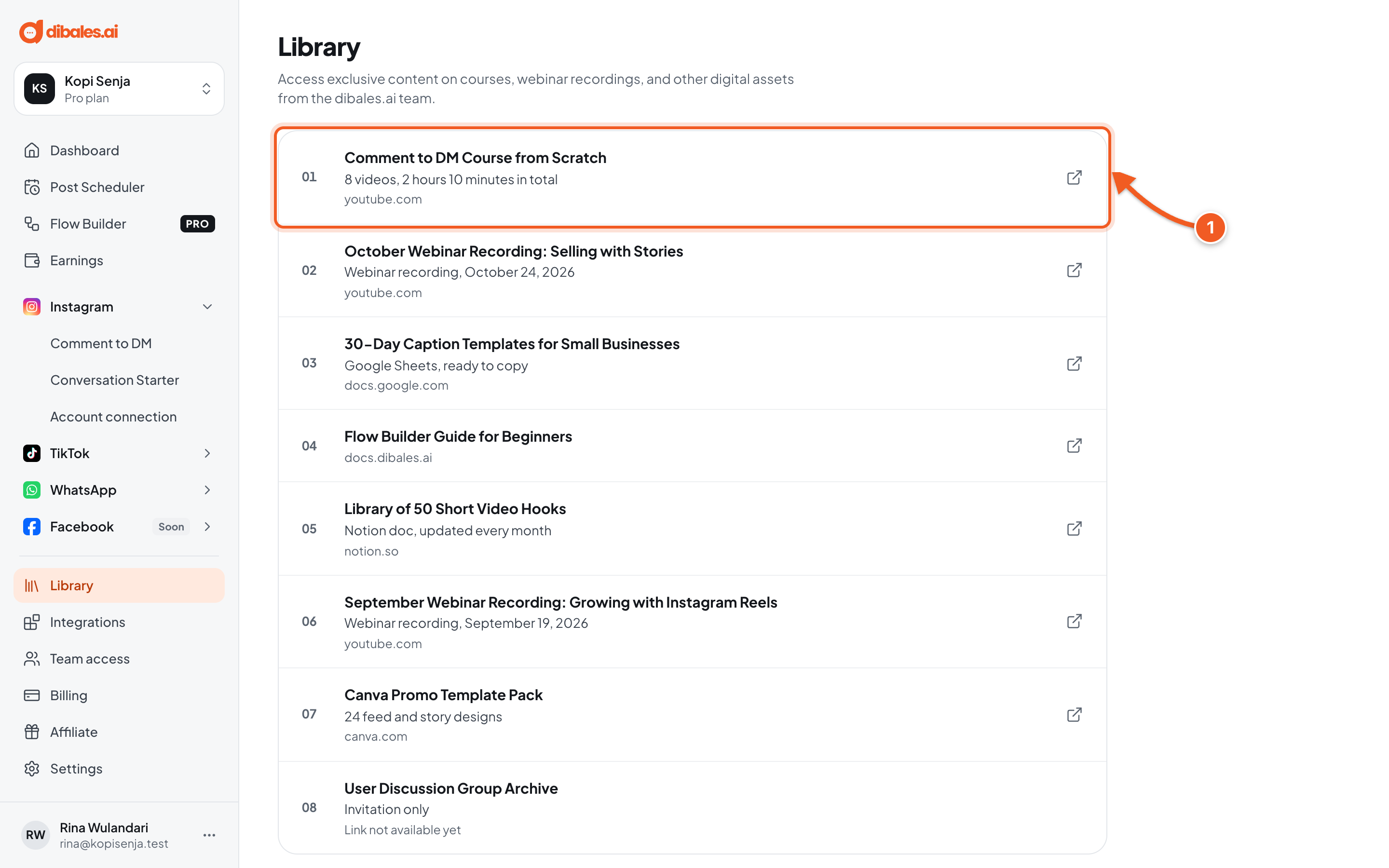
- Each item shows a title, a short description, and its source (for example YouTube or Google Docs). Click an item to open it in a new tab. Items marked Link not available yet can't be opened yet.
New materials are added from time to time, so check back now and then.
Troubleshooting
| Problem | Fix |
|---|---|
| Library is not open yet | Library is only for users with an active paid plan. Click View plans to choose or renew a plan, see Billing. |
| Items marked Link not available yet | The material is still being prepared. Check back later. |
| No materials yet | Nothing has been published yet. Check back for the next update. |
| A material doesn't open after you click it | Materials open in a new tab. Allow pop-ups for app.dibales.ai, then click again. |